



For New Zealand licensed immigration adviserssolo advisersgrowing practices

More clients. Not more hours.

The smart practice manager built for New Zealand licensed immigration advisers. Every case, deadline, document and message in one place, with client files kept in Auckland. Start free.

Where Clerq started

Built inside a working New Zealand immigration practice.

Provisas Immigration Advisers Target Language Academy Professional Group Limited Trailblazer Predictive

Spend less time chasing clients for documents.

Work visa application

2 of 4 documents in

  • Passport In
  • Signed agreement In
  • Payslips, last three months Waiting 6 days reminder sent
  • Police certificate Waiting 12 days reminder sent

At risk. The current visa expires in 23 days, and the police certificate is still outstanding.

An illustration. The file shown is synthetic.

Most of an adviser’s week goes on waiting: for a payslip, a police certificate, a signed agreement, a reply. Clerq does the chasing so you can get on with the advice.

  • It knows what’s missing.

    Every file shows which documents are in, which are outstanding, and how long you’ve been waiting.

  • The reminders are ready to send.

    Follow-ups for anything still outstanding are queued for you to send, in your practice’s name.

  • Dates at risk come first.

    A deadline at risk moves to the top of your day while there is still time to deal with it.

Leads Dashboard

Every enquiry, on one board.

Enquiries from your website form and your website chat land on one board, and you can start one from any email in your inbox. A developer can also send enquiries in from another CRM or your own forms, through Clerq’s API and a key your practice can revoke. Clerq can send each form enquiry a first reply in your practice’s name, in words you write. Set your own scoring criteria and it grades the board against them.

When someone signs, Convert makes them a client and opens a case for each piece of work you have recorded, with the enquiry’s emails, meetings and documents filed onto one of them.

  • An AI assistant on your own website answers general questions from your practice’s information, takes the enquiry and hands it to a person. It is built not to give immigration advice.
  • Each enquiry has a conflict check that looks for existing clients with the same email, phone or name before you take the person on.
  • A rotation sends new enquiries round your advisers in turn, or to whoever has fewest open, and skips anyone marked away.
  • The lead report shows how fast you reply and where enquiries come from, and each closed enquiry keeps the reason it stopped.
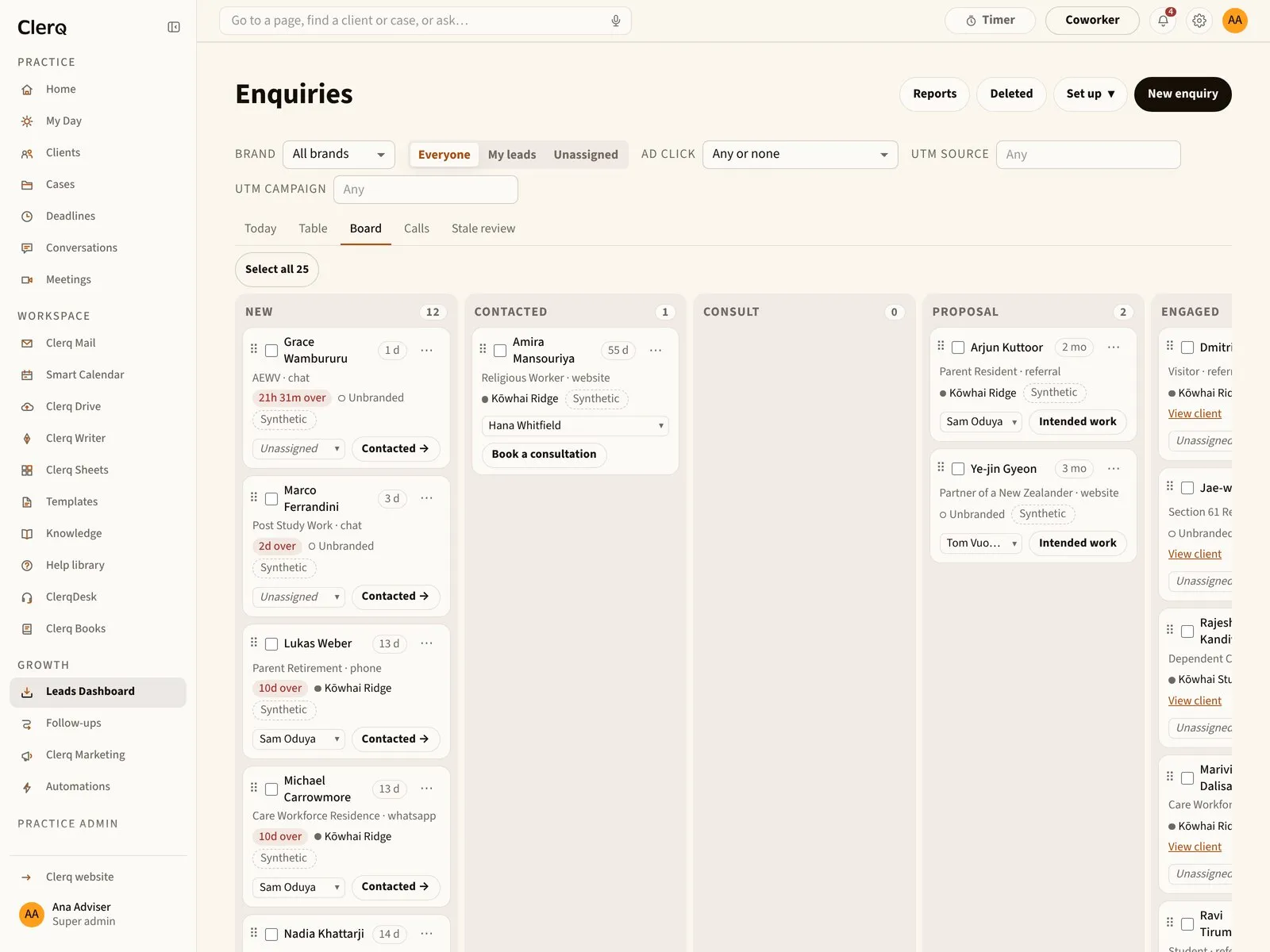
The Leads Dashboard board with enquiries in the New, Contacted, Consult, Proposal and Engaged columns. Each card shows the person, where the enquiry came from, the visa of interest, how long it has waited or how far it is past its first-contact target, and its owner.

The practice shown is synthetic.
Open it and you know what to do next.

The first screen lists what needs you today, such as an overdue date, a missing document or a client who is waiting on a reply.

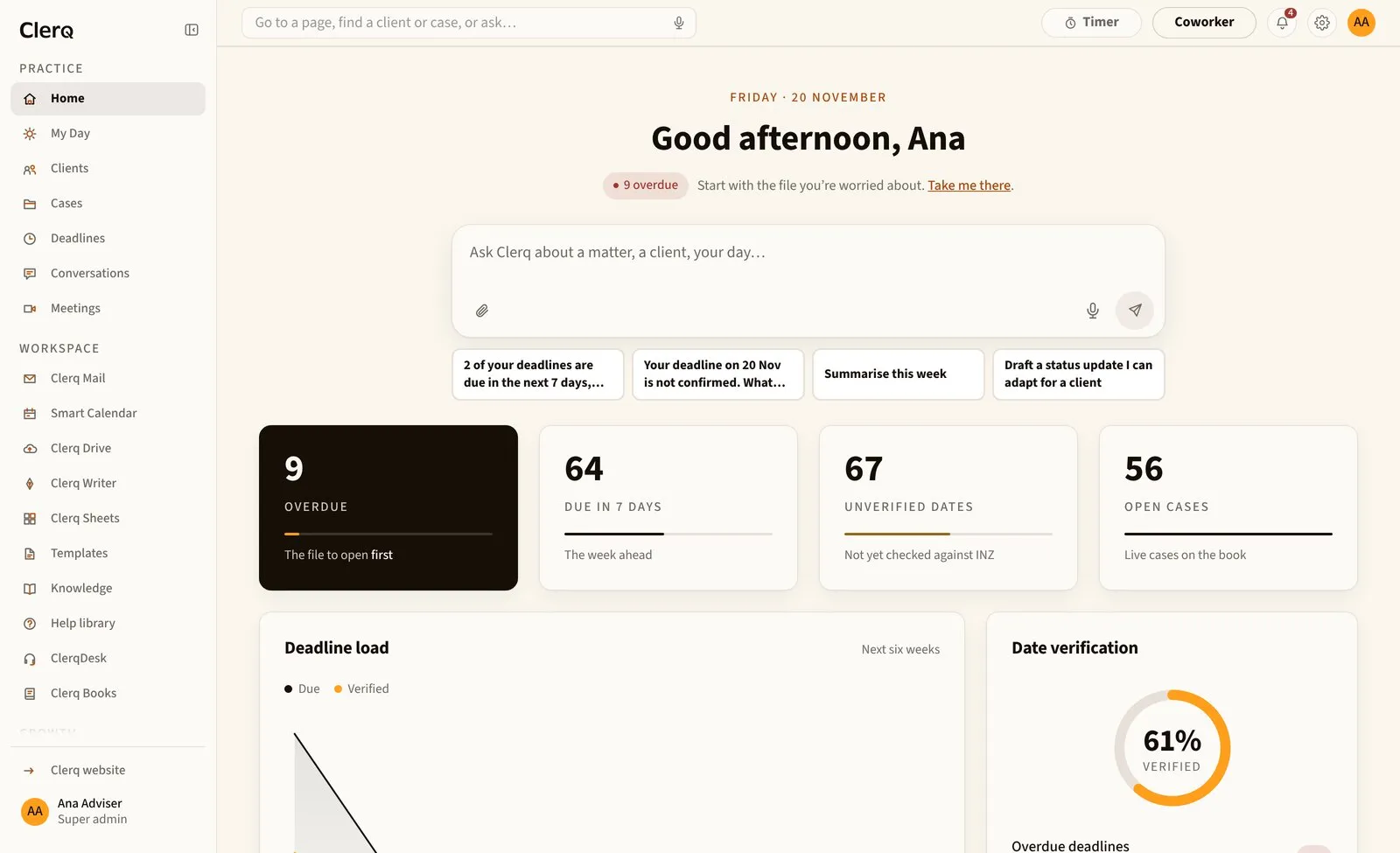
Home. What needs you first today. The practice shown is synthetic.
The Clerq home dashboard: the greeting, the overdue count, the assistant prompt with suggested questions, the day’s figures, the deadline load and how many dates are verified.
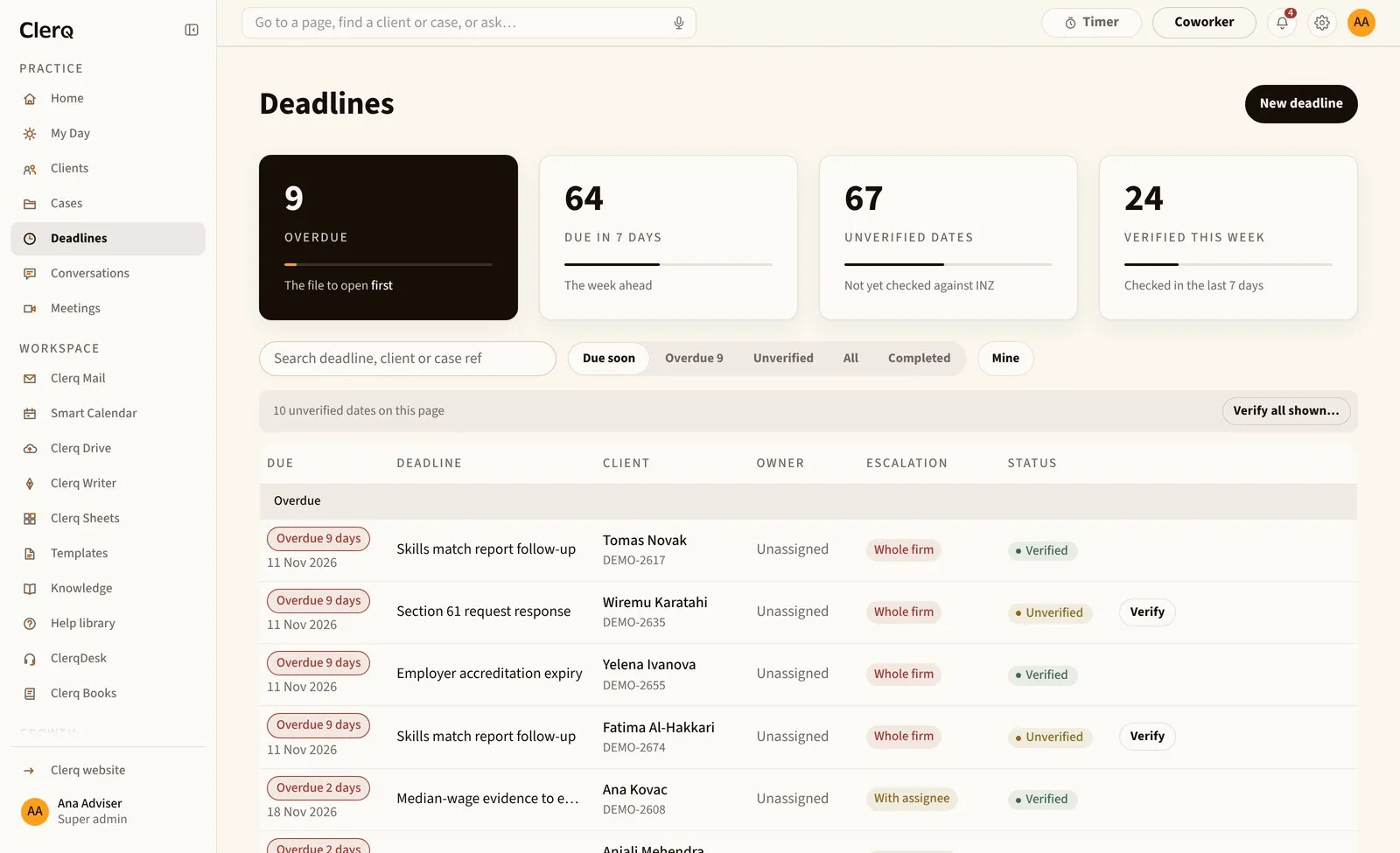
The Deadlines page: 9 overdue, 64 due in the next seven days, 67 dates not yet checked against INZ and 24 verified this week, then each date with its client, case, escalation and whether it has been verified.
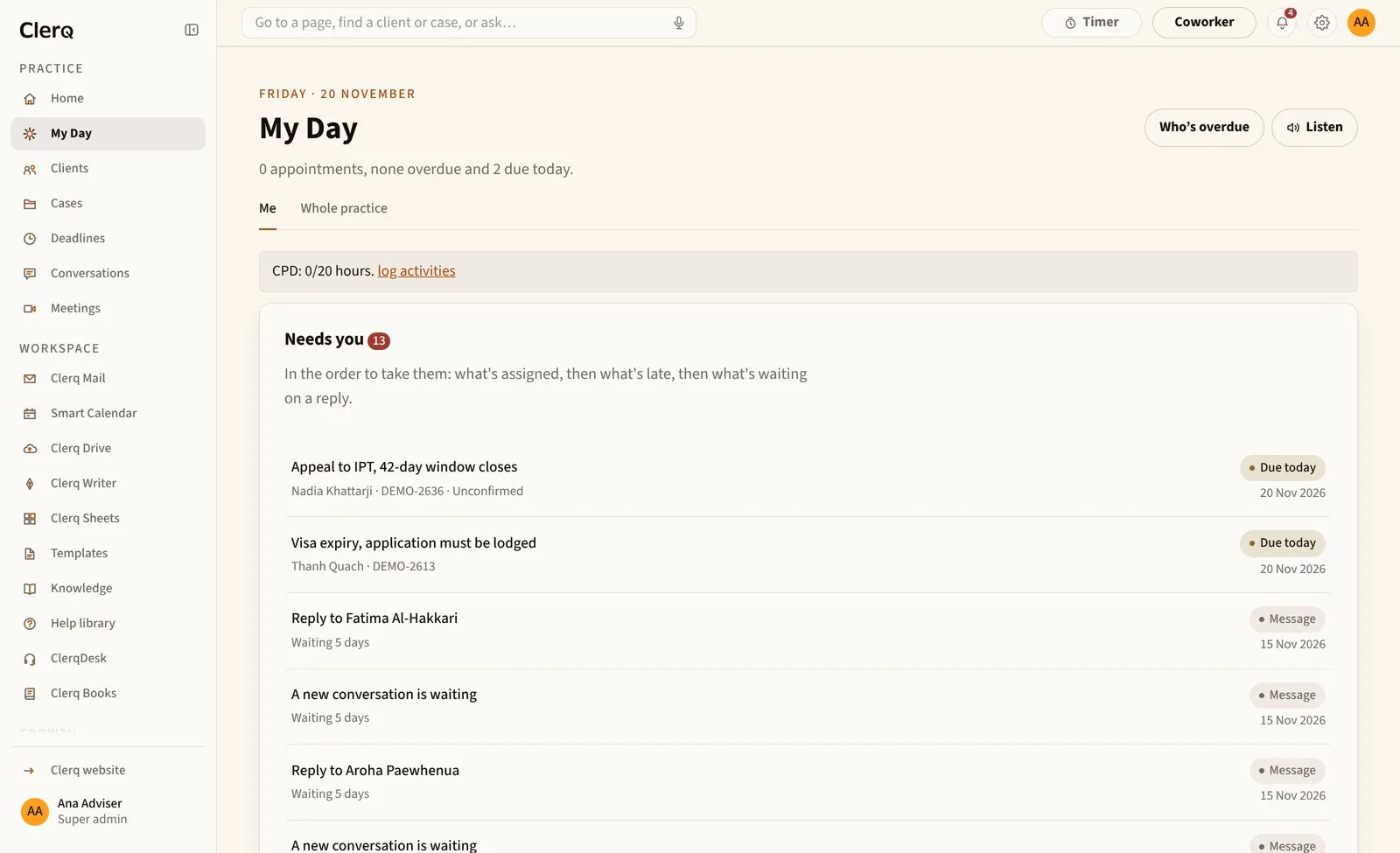
The Clerq My Day page: the day’s summary with a Listen button, then the ranked Needs you list, starting with two deadlines due today, then client messages waiting on a reply.
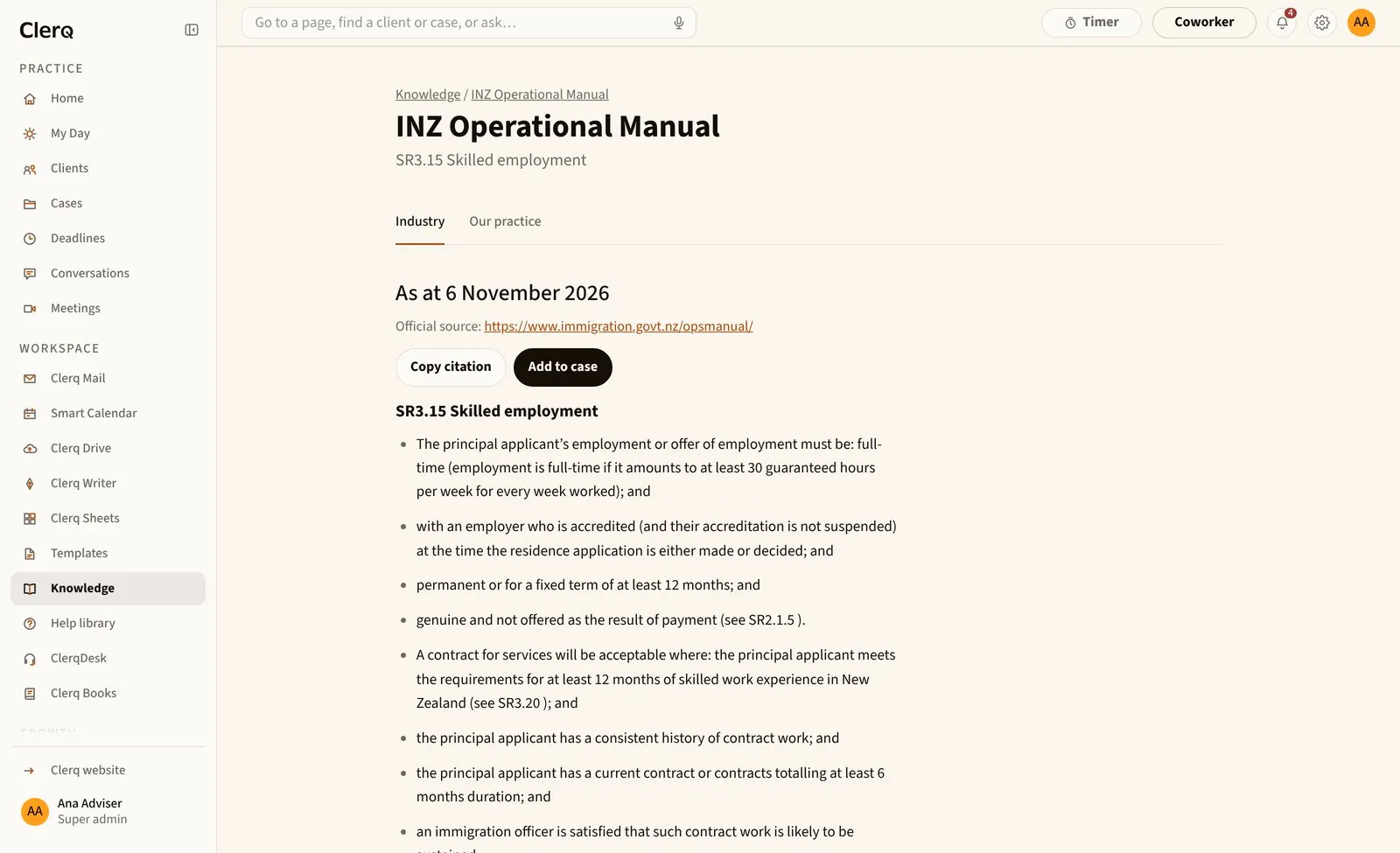
The Knowledge library, Industry tab, open at INZ Operational Manual section SR3.15, Skilled employment, as at 6 November 2026, with a link to the official source, Copy citation and Add to case.
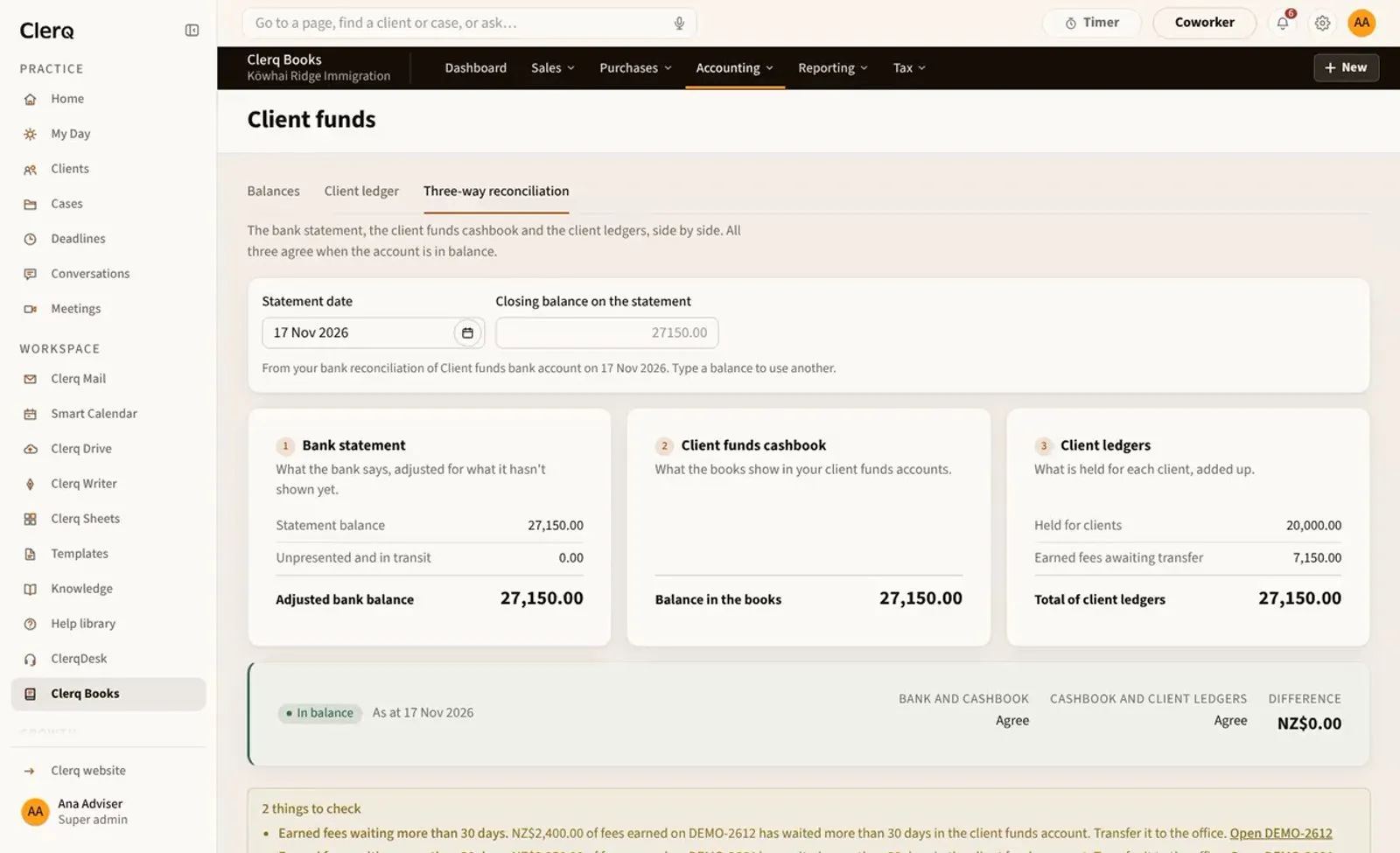
The three-way reconciliation of a client funds account: the bank statement, the cashbook and the client ledgers each at 27,150.00, marked in balance, with cases flagged where earned fees have waited more than 30 days.
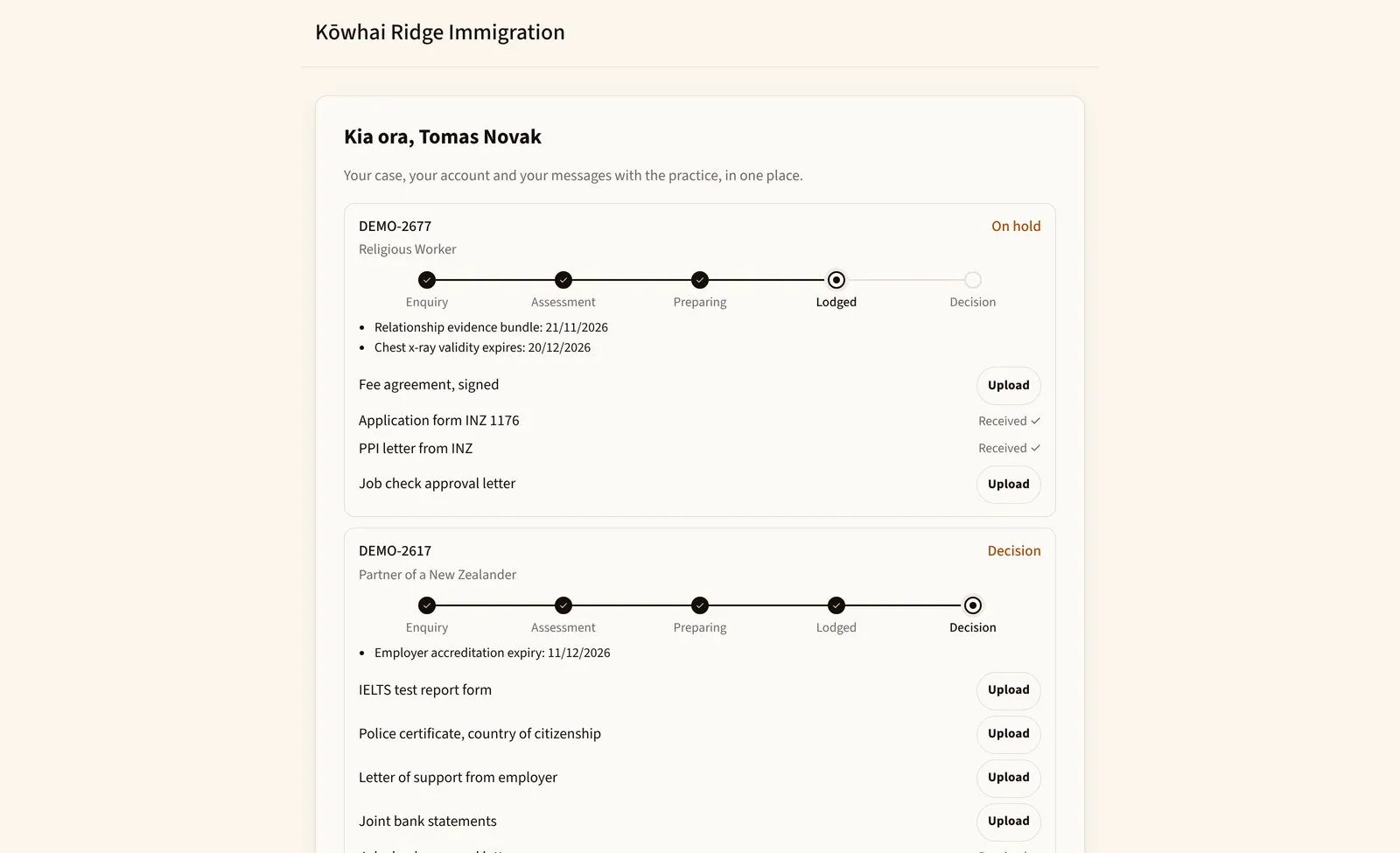
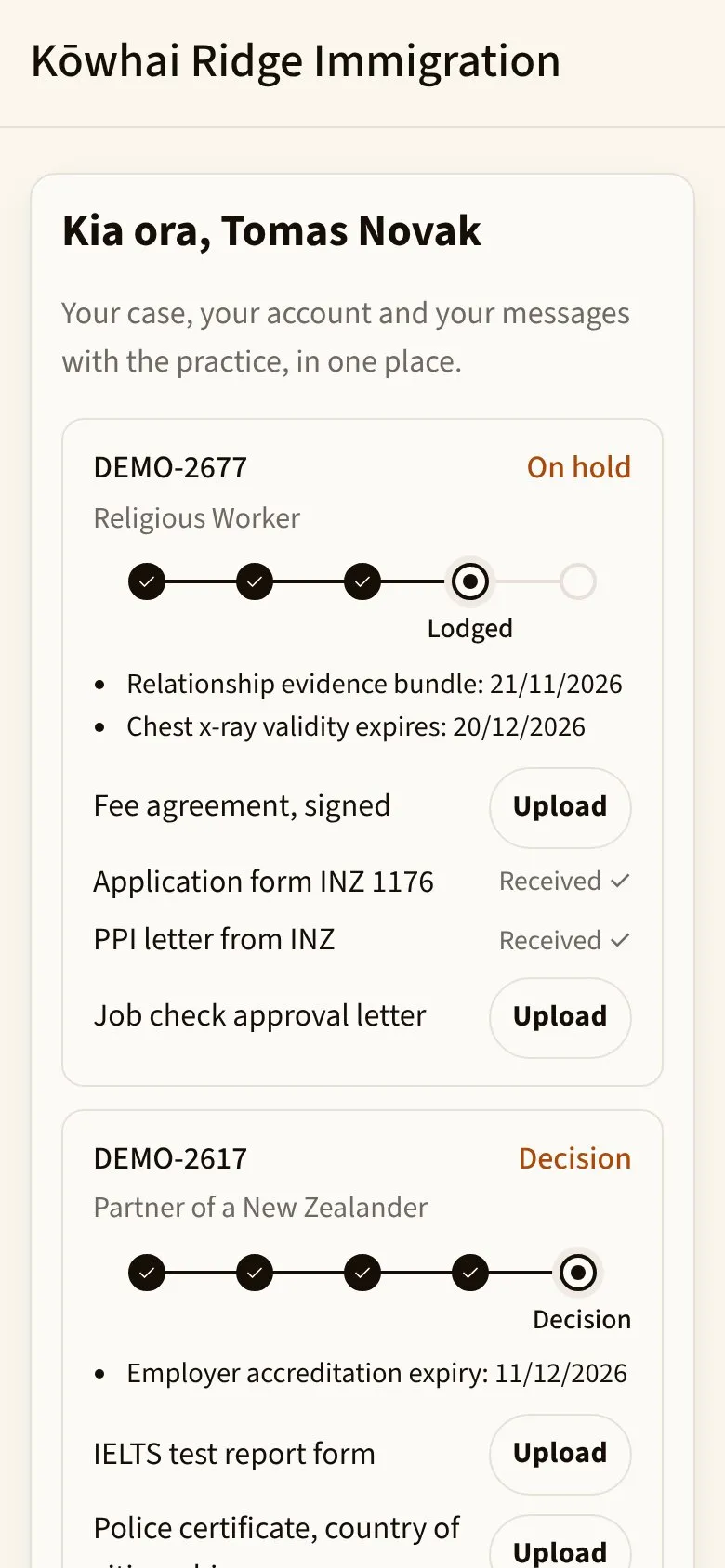
A client’s portal: their case with its stage, the key dates, and the documents received and still to upload.
The same client portal on a phone: the case, its key dates and the documents to upload.
Book a 15-minute walkthrough

See it work, in a minute.

One client, from a new enquiry to the letter you check before you sign. Turn the sound on.

The practice shown is synthetic.
What Clerq does

Messages

Stop searching for that message.

Email, notes and meetings sit on the client’s file.

Drafting

The first draft is already written.

Clerq drafts routine documents from what’s on the file. You review and sign off.

Deep Analysis

A second opinion before you advise.

It asks the follow-up questions, then sets out an approach to the case for you to weigh up.

It checks the file before an inspector does.

Most of what makes Clerq smart is in the free practice system. These run on rules, not AI, so they use no credit.

01

Every file, checked against clause 26

cl. 26

Each client file shows what the Code requires and what’s missing, and the whole file exports the way the Authority asks for it.

02

Agreements go out complete

cl. 6 and 19

Clerq won’t send one that’s missing what clause 19 requires, or while a conflict still needs the client’s written consent. It won’t issue an invoice without an accepted agreement either.

03

You see which files are slipping

Overdue dates, an unaccepted agreement or a gap in the file shows on the case and on one risk board. Clients on a live matter with no email or meeting in 21 days are flagged too.

04

Expiry dates, 90 days out

Client visa, police certificate, medical and employer accreditation dates due in the next 90 days are listed before they lapse. Your own licence and PI insurance get reminders at 90, 30 and 7 days.

05

Client money, reconciled three ways

Clerq keeps a statement of what you hold for each client and reconciles the client funds account against the cashbook and the client ledgers. It records the money; your bank holds it.

With AI credit, it drafts and checks, and you decide.

These use AI and draw on prepaid credit. Each one hands you a draft, an answer or a flag.

01

A second read before a letter goes out

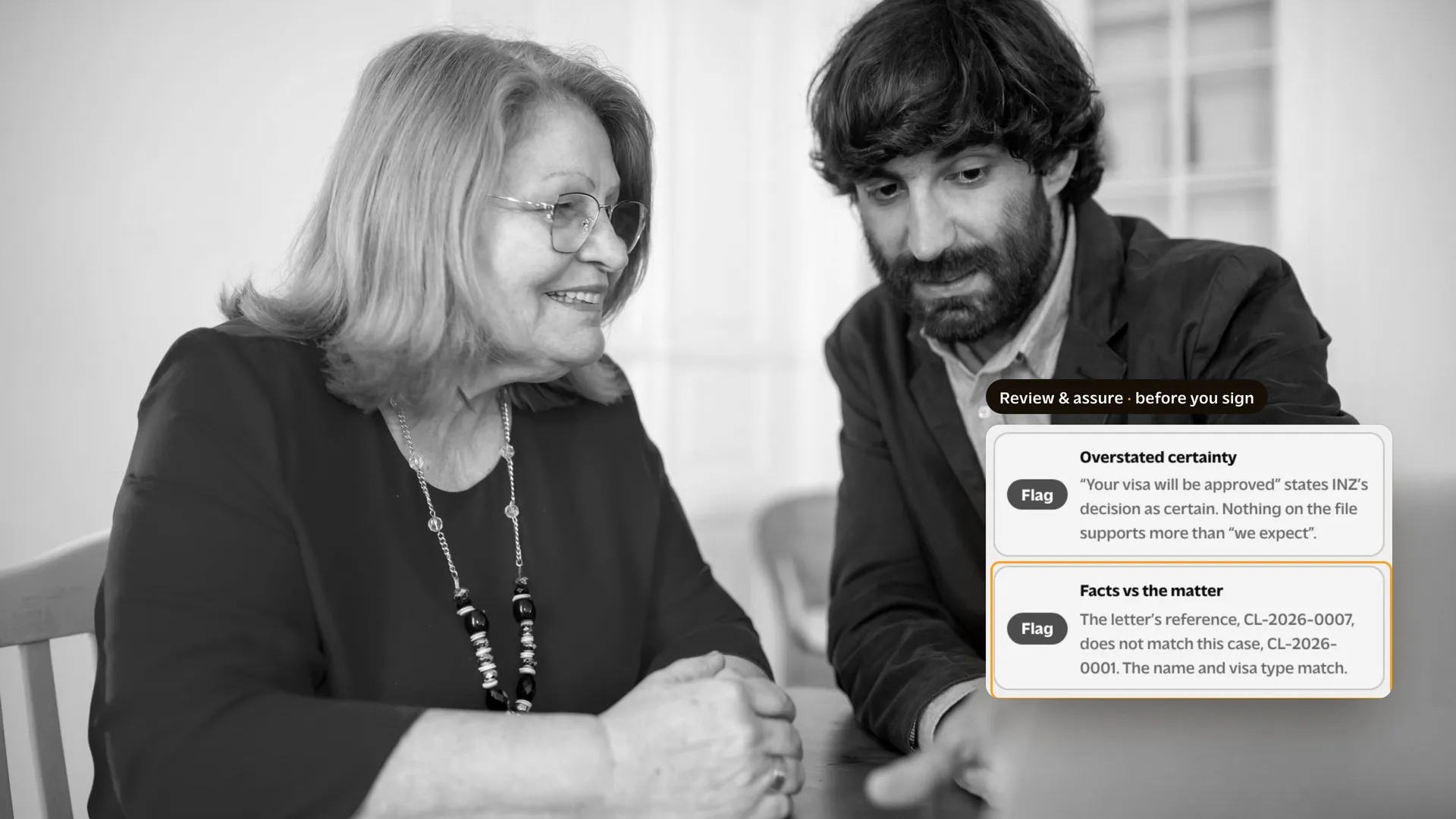
Run the review and Clerq flags anything that reads as unlicensed advice or overstates certainty, and checks each fact against the case file.

02

Questions about the file, answered

The Coworker answers questions about the case, client, inbox or day in front of you, and writes a first draft when you ask.

03

Questions about the rules, answered with sources

Ask the Industry library about INZ’s Operational Manual, circulars, Visa Paks or the Code, and each point in the answer cites its source. If the library holds nothing on it, you’re told so and no credit is spent.

04

The consultation becomes a draft file note

Once the client has consented, record the meeting in the browser or upload the recording. A draft file note waits for you to accept it.

05

The agreement, explained in the client’s language

cl. 18

When you turn it on, clients read a plain-language explanation of your agreement in English or one of 21 other languages before they accept. You confirm every paragraph first.

Switching is the easy part.

Moving from Zoho, HubSpot or a spreadsheet? We move your client records across for you. Your team is working in Clerq within a week.

Works with

  • Microsoft
  • Google
  • Zoho
  • Xero

Our story

We built the system we couldn’t buy.

Clerq started inside a New Zealand immigration practice. We ran our files on Zoho, then moved to HubSpot. Both were built for sales teams rather than for advisers working under the Code. We kept what they did well and built the rest around how an immigration practice runs day to day.

  1. 01 Zoho Built for sales teams
  2. 02 HubSpot Built for sales teams
  3. 03 · May 2026 Clerq Built for advisers working under the Code
  4. 04 · July 2026 Auckland Live on New Zealand servers, with its own mail, calendar and files
  5. 05 Today More than 1,300 changes since June. Now taking practices one at a time.

Your client files are stored in Auckland, walled off from every other practice’s, including the practice Clerq came from.

The full story

Built around the Code from the start.

Engagement terms, conflicts, custody of originals and complaints each have their own place in the product. They are the reason Clerq exists, and they are in the free plan, because we don’t think compliance should cost extra.

Auckland Client files are stored here Terms of Service, cl. 9.3
2014 Built around the IAA Code of Conduct iaa.govt.nz
0 Client files used to train any AI model Contractual term
AES‑256 Encryption at rest, for every client file Terms of Service, Schedule 1

What Clerq is

Clerq is a smart practice manager for New Zealand licensed immigration advisers. It runs cases, deadlines, client files and a real practice mailbox as one record, from first enquiry to file closure, with the IAA Code of Conduct 2014 built into each step of the work instead of sitting in a separate compliance tab. Client files are stored in Auckland.

Built for
New Zealand licensed immigration advisers
Governed by
The IAA Code of Conduct 2014 and the Privacy Act 2020
Client files
Stored in Auckland, New Zealand
Backup
An encrypted copy of the practice database is kept in Sydney, Australia
The boundary
Clerq prepares the work. A licensed adviser reviews it and submits it.

Start free. Pay as you grow.

The Free plan

$0

a month

Not a typo

A real plan, not a trial.

The full practice system for one adviser, with NZ$20 of AI credit to start and your first 3 retained cases free each month. Practice, Firm and Enterprise when you grow, and the first 20 early-access practices get Enterprise onboarding free.

Get early access

Start with the file you are worried about.

We onboard one practice at a time, so the first conversation is about your own work. Bring the dates that are overdue and the documents you are still chasing, and we’ll look at what Clerq would have done about them.